Concepts
This chapter briefly introduces how each module of this add-on works and the design decision behind them, as a development reference of customizations.
Effects Chain
Effects in this add-on are shader node groups. To reproduce common 2D visual effects and ensure the same result with both EEVEE and Cycles engines, the node group:
- Involves: Math operations on the
UV,ColorandAlphavalues of the Image Texture Node that loads the media. - Does not involve: Accepting geometry and lighting information from the 3D scene; using BSDF and other built-in shaders.
Although the task of each node group is not complicated, the add-on still creates a new panel for users to operate with, rather than provide node groups directly as Blender assets. This is because of the difficulty stated in the following section.
Shader Node Hierarchy
When a series of effects are added to the same media ([Media]->[FX1]->[FX2]), we expect the node structure to align with intuition, where the node groups of FX1 and FX2 are connected to the media in a cascade. However, many effects involving modifying the texture’s UV (an input socket) and color/alpha (output sockets) at the same time, requiring to place the texture node in the middle of the effect node group. Multiple such effects will lead to a nested structure as depicted in the following diagram:
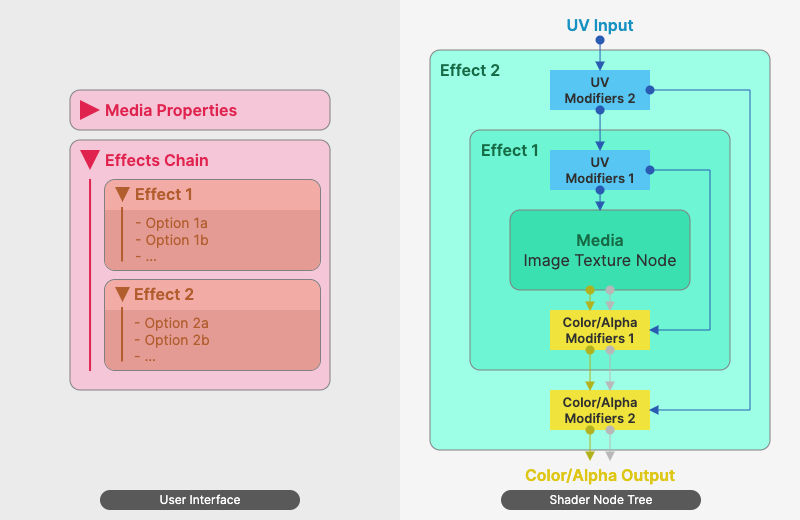
This structure brings obstacles when the user wants to update the effects stack:
- When replacing the media, the user needs to click into the node group for multiple times.
- Reordering the effects or inserting a new effect between two existing ones also require multiple steps of operations.
- Effects like Blur or Outline need multiple sets of UV, further increasing the complexity of manual operations.
Considering this, the add-on provides with functions to automate these processes, and defines a side panel to sort the effects visually in an intuitive way.
Methods/Tools Not Adopted
- Closure: Blender 5.0 introduced the concept of closure. It may provide with a more reasonable abstract to the problem this add-on concerns, and replace the nested node groups with a cascade topology. However, the concept is relatively new in Blender, and this add-on aims at being compatible with both Blender 4.x and 5.x. Therefore, the closure nodes are not used.
- Compositor: Despite that the functionality of this add-on is more like compositing in the aspect of the video production workflow, it chooses to implement effects using shaders rather than the Blender Compositor. The concern here is the active updates and refactoring of compositor since Blender 5.0. It is currently uncertain whether this add-on’s concept will align well with the official roadmap of compositor. The feature this add-on concerns the most is setting up different effects stacks for each object in the scene, which cannot be done easily in the current compositor. Although it has been discussed in the official community, the way of implementation has not been settled down.
Playback Control
Blender supports using a video as an image texture and changing its start frame and offset. By increasing/decreasing the offset value during playing the video, the playback can be accelerated/decelerated. However, the offset attribute is not a socket and cannot interact with other nodes. Setting its value dynamically can only be done by inserting keyframes or drivers. It is also not straightforward to convert the playback rate to the offset value. Therefore, the add-on simplifies the process by generating driver expressions automatically and inserting it to the frame offset attribute.
Global Manager
This component attempts resembling the popular NLE (Non-linear editing) tools of video production to manage multiple video textures in a 3D scene. Since Blender NLA Editor has many similar concepts with NLE tools, this component chooses it as the base of the implementation and wraps the playback keyframe channel of each video texture into an NLA track strip.
However, different from NLE where the video strip is the main subject, in the 3D scene, a video texture is just a material node. Moving its keyframes will not affect the animation data of the object’s other properties (e.g. location, visibility and material parameters, including those of effects node groups created also by this add-on). This is counter-intuitive to the video production workflow. The solution of the add-on is to capture the user’s inputs. After each input event, the add-on checks whether any NLA strip is updated, locates the scene object of the updated NLA strip, and then remaps its keyframes. One drawback of this solution is the limited capability of an add-on to capture input events. Certain inputs will be omitted, requiring the user to click once more to ensure the keyframes synchronized.